DailyCosmos

For the whole family

Run your home, together.

DailyCosmos shares the work of running a home: who does what, the week's meals, the money, your health, care for family, and your trips, all in one private app you share with the people you choose.

Early access · Free for 30 days · Android 7 or newer

Founding members

Join the first 5,000 families

₹49 a month, kept for as long as you stay. Nothing is charged before January.

Get the app

The app

Every area, at a glance.

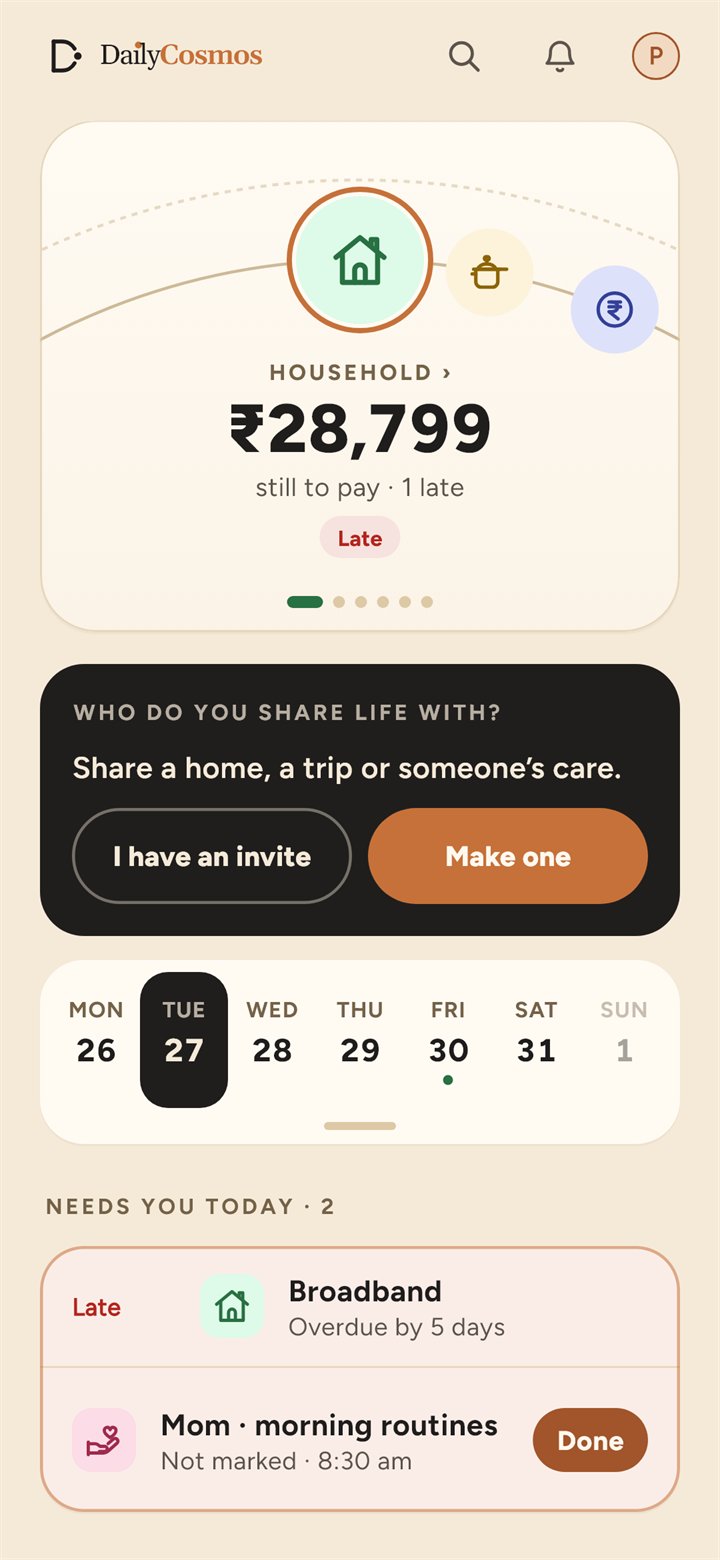
Each area opens on one screen that tells you what matters today. Tap any screen to see it larger.

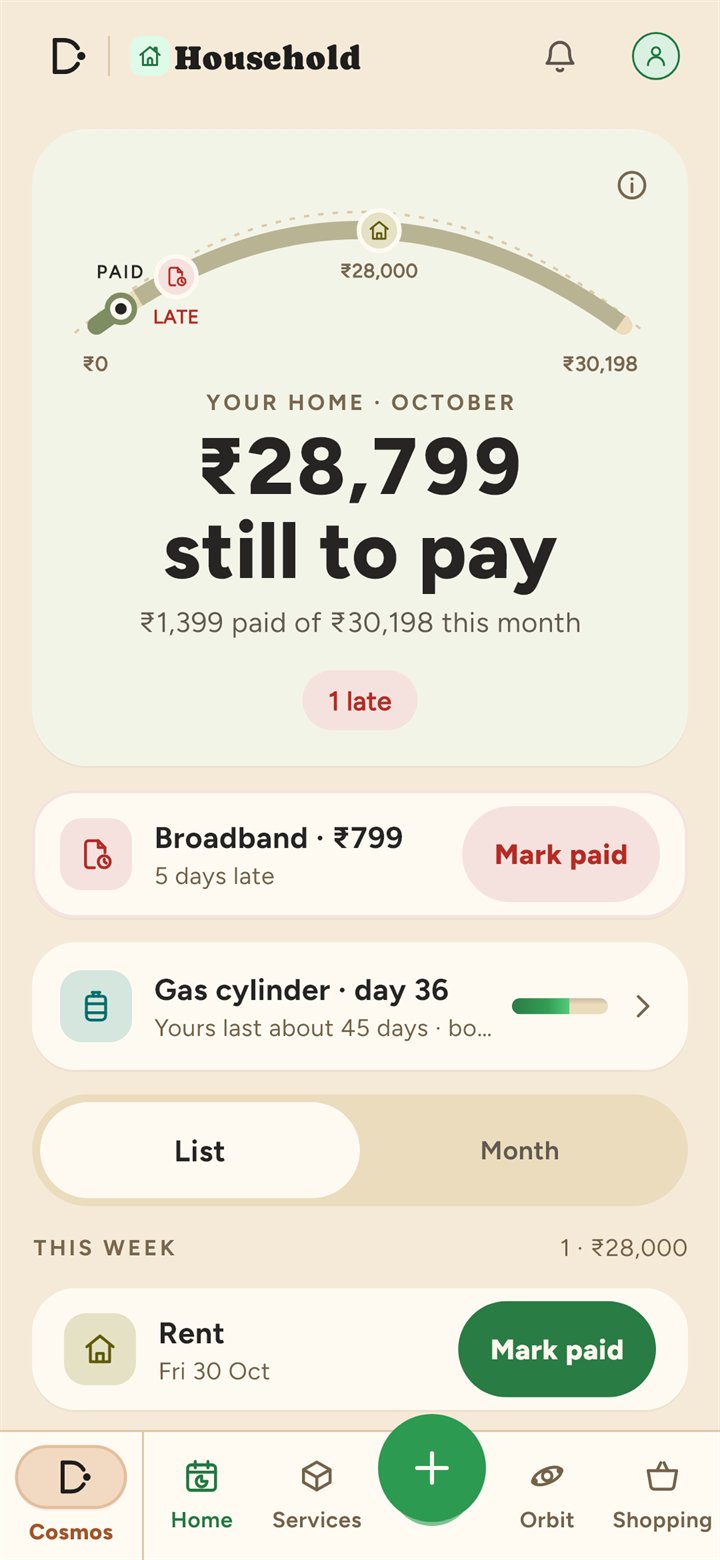
HouseholdWhat the home still has to pay.
KitchenToday's meals, and what is next.
MoneyWhat is left this month, after the bills.
HealthWhat's next, and when.
CareWho needs you today, and what is not marked yet.
TravelThe next trip, and how ready it is.

Features

Six areas, one consistent app.

Each area of family life has its own space in DailyCosmos, with its own tools and reminders. Use one, or all six.

  • End-to-end encryptedData is encrypted on your phone before it is backed up.
  • Works offlineEverything saves on the device and syncs when you are connected.
  • Shared through orbitsShare with the people you choose, in the areas you choose, never your whole account.
  • Your data, portableExport everything as a spreadsheet, or delete it at any time.

Orbits

The people you share life with, in one place.

An orbit is the people you share with: your household, the family looking after a parent, friends on a trip. Make it once and use it in every area it fits. The first thing the app asks after you sign in is who you share life with.

  1. Make an orbit

    Give it a name, add people, and choose where it is used: Money, Household, Kitchen, Care and Travel.

  2. Invite by link or QR code

    One invitation puts someone in the orbit, in every area it is used in. There is nothing else to accept.

  3. Bring it into another area

    Anyone in an orbit can use it in another area, and everyone in it is told.

  4. Look after someone together

    In Care, name the person you look after and choose the orbit that helps. You see what everyone in it will see before you choose.

Your orbitsEveryone you share with, one card each.
One orbit, every areaIts people, where it is used, and what happened lately.
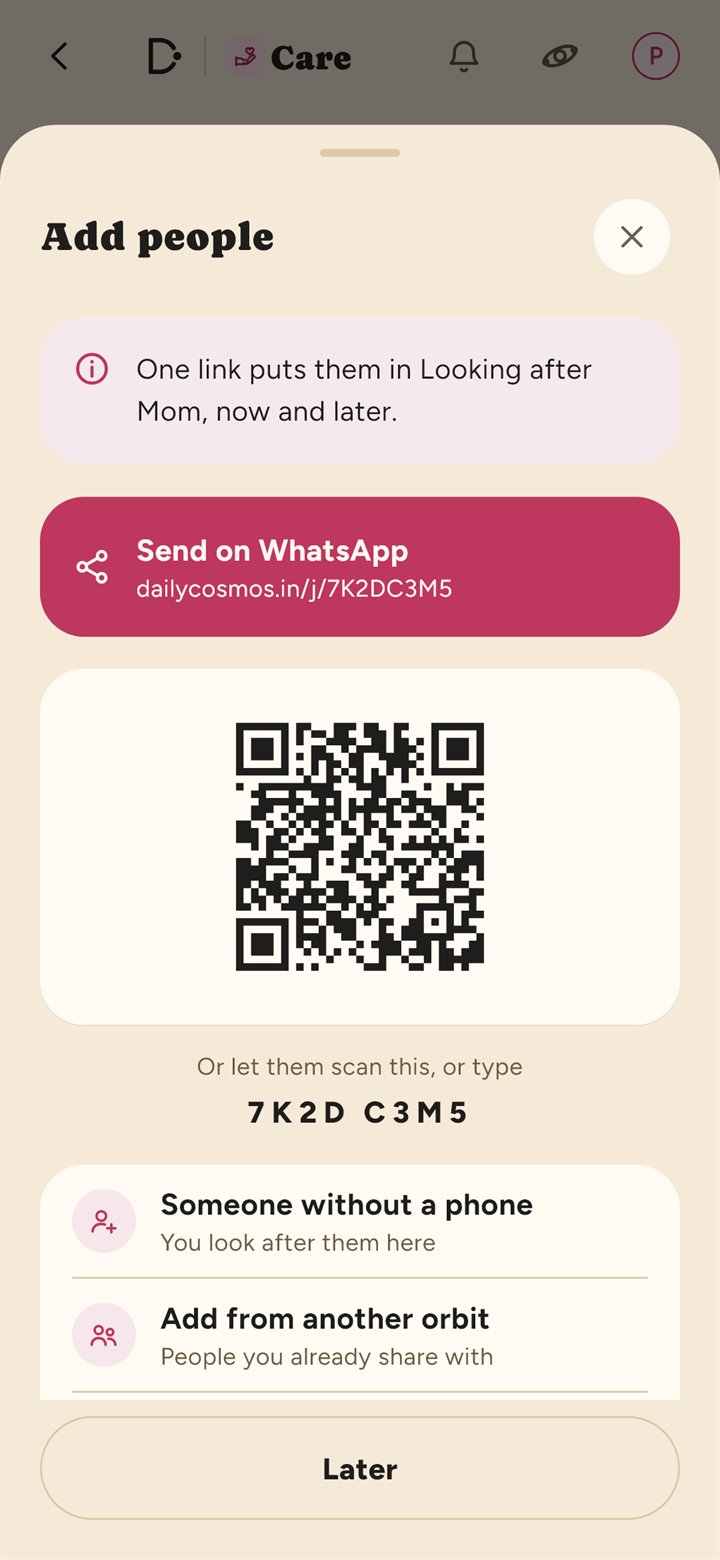
InviteA link, a QR code, or a code to type.
Home management

Household

Share the work of running a home: who does what, the bills and renewals, the people who help, and a shopping list everyone can add to.

  • Who does what: share the jobs around the home, each worth a few points. A job can have steps, like Cooking split into Breakfast, Lunch and Dinner, each with its own points. Mark a job done right from the Orbit tab, and give extra points on a day that needed more.
  • Bills and renewals (rent, electricity, insurance, servicing), each set up with how often it repeats, from every few days to every few years, and a reminder before it is due.
  • Helpers: pay days, leave, half days and extra days, with the salary worked out for you.
  • Services: appliances, vehicles and bookings, with documents and service history.
  • A shared shopping list for the whole household, linked with Kitchen.
  • Gas cylinder log: note when each cylinder starts and runs out, and see how long one lasts.
  • Vehicle fuel log: your real mileage from your fill-ups, and a service reminder from it.
Who does whatJobs with points, shared around the home.
ServicesBills, helpers and bookings.
Shopping listShared by the household.
Meal planning

Kitchen

Plan the week’s meals and generate the shopping you need, based on what is already at home.

  • Weekly meal planning for breakfast, lunch and dinner.
  • A recipe book with your family’s dishes and a library of dishes from across India.
  • Can make now: the dishes you can cook with what is already at home.
  • Pantry tracking that flags items running low.
  • Automatic shopping lists built from the meal plan, excluding what you already have.
  • Cook mode keeps the screen on and provides step timers.
PlanningThe week, day by day.
BookWhat you can make now.
ShoppingBuilt from the week.
Personal and family finance

Money

Track spending, stay within budget and manage shared costs with family or flatmates.

  • Expense tracking by category and payment method: UPI, cash or card.
  • Monthly budgets showing what is left after the bills still to pay, and about how much that is a day.
  • Shared and split spending: use an orbit in Money to see where you stand with everyone at a glance, what each person owes, and the fewest payments that settle everyone up. The same orbit can also be your home in Household and Kitchen.
  • Leaving or ending an orbit: hand it to someone else when you leave. An orbit is ended only after everyone in it agrees, and anyone who wants to keep it can take it over.
  • Bills and subscriptions with reminders before they are due, and one tap to mark them paid.
  • Scan a receipt to fill in the amount, the shop and the date. Nothing is saved until you check it.
  • A monthly plan for a goal or a loan: set an amount and a day, and the entry is written for you each month.
  • Loans and savings goals: who owes you and what you owe, how much has been repaid, and a goal you can see filling up. Interest is calculated automatically.
OverviewBudget and recent spending.
SpendsThe month, day by day.
Loan bookOwed to you, and repaid so far.
Your own health

Health

What you track and the routines you keep, kept simply. No scores, no streaks and no calories.

  • Weight, with a chart that shows real change and not alarm.
  • Daily routines, with a reminder at each time and one tap to mark them done.
  • Steps and workouts, counted as days you moved, never a streak.
  • Meals, in your own words.
  • Share your weight with Care when family looks after you, and only what you choose.
TodayWhat is next, at a glance.
WeightYour trend over time.
RoutinesToday, morning to night.
Caregiving

Care

An orbit of the people you look out for: family and friends checking on each other, and daily routines and care for up to four family members, with every caregiver working from the same schedule.

  • Orbits of people: name the person you look after and choose who helps: an orbit you already have, or a new one. Invite by QR code or link.
  • Check-ins with one-tap answers: Had lunch?, Reached office?, from ready-made lines for a parent, spouse, child or friend, answered straight from the notification.
  • Daily check-ins they agree to: nothing repeats until the other person allows it, they can pause it, and you hear once if a day goes unanswered.
  • I'm okay, reached safely, I need help: a call for help rings every phone in the orbit until someone taps I'll go.
  • An Easy view for a parent's phone: one screen, big buttons, larger text, and every card read aloud at a tap.
  • Daily routines with a reminder at each time, marked done with one tap.
  • Routine attribution, recording which caregiver marked each one.
  • Handover notes between caregivers.
TodayWho needs you, and what is not marked.
Looked afterThe day’s routines, one person at a time.
Trip planning

Travel

Plan a family trip from anywhere to anywhere, and keep everything you need for it in one place, readable without a signal.

  • From anywhere to anywhere: start from your location (only the town is kept) or any town in India.
  • A plan for the trip: when to go, how long, who is going, and a rough cost to expect.
  • Bookings and tickets, with the PNR or reference ready on the day.
  • Packing lists for the whole family, and who is carrying what.
  • Place guides, and spots you save for a trip you have not planned yet.
  • Travel documents: passport and visa dates, mentioned once, three days before a trip they would lapse on.
  • Share the trip with an orbit, so everyone sees the same plan. Documents are never shared.
TripsThe next one, and how ready it is.
Plan a tripFrom anywhere, to anywhere.
DocumentsPassport and visa dates.

Sharing

Secure sharing, on your terms.

Share with the people who need it, through an orbit, in the areas you choose. Before anyone is added, DailyCosmos shows exactly what they will be able to see.

Invitation links

Send a link by WhatsApp or SMS. It opens the app directly, or installs it first.

Join once, for every area

Joining an orbit gives you every area it is used in. Leaving takes you out of all of them.

QR code onboarding

Connect a phone in person by scanning a code. No camera permission is required.

Per-person access

See who is in each orbit and where it is used, and take someone out at any time.

You are told who left

When somebody leaves an orbit or is removed, everyone still in it is notified.

YouYour account, and nothing about anyone else.
Shown firstWhat everyone in the orbit will see.

Security and privacy

Private by design.

Family health and financial records deserve the highest level of protection. DailyCosmos is built so that your data can only be read on your own devices.

End-to-end encryptionRecords are encrypted on your phone before backup. Our servers store only data they cannot read.
No access to your accountWe hold no key that can decrypt your data, so it cannot be accessed or reset by anyone else.
Sharing you chooseAn orbit is used only in the areas it is brought into, and everyone in it is told when that changes.
Nothing sent on your behalfMessages to family are prepared for you; you choose to send them in WhatsApp or SMS.
App lockProtect the app with your fingerprint or device PIN.
Export and deletionExport all your data as a spreadsheet, or delete your account at any time.

Download

Get DailyCosmos for Android.

DailyCosmos is in closed testing on Google Play, and you can install it straight from this website while testing continues. It reaches the Play Store for everyone on 22 October 2026.

  1. Download the app on your Android phone. If your browser shows a warning, choose Download anyway.
  2. Open the downloaded file and allow installation from your browser or file manager when prompted.
  3. Tap Install. If Google Play Protect asks, choose Install anyway.
  4. Sign in with Google or your email address.
Download DailyCosmos
Version
Early access
Size
About 33 MB
Released
Loading
SHA-256
Loading

Updating? Install the new version over the existing app. Uninstalling first removes the data stored on your phone.

Requires Android 7 or later. For older 32-bit devices, use the 32-bit version. An iOS version is planned.

FAQ

Frequently asked questions.

What does DailyCosmos cost?

Everything is free for 30 days, counted from launch day, 22 October 2026. After that, one plan covers every area: ₹99 a month for you, or ₹399 a month for a family of up to four from your orbits. Join before 31 December 2026 and pay half (₹49, or ₹199 for a family) for as long as you stay subscribed. If you stop, everything you saved stays readable and exportable.

Do I need to use every area?

No. Household, Kitchen, Money, Care and Travel are on to start with, and Health is one tap away on Your Cosmos. Use only the ones you need.

How is my data protected?

Your data is encrypted on your device before it is backed up, and we hold no key that can decrypt it. Shared information is visible only to the people in the orbit it belongs to.

What happens to my mobile number and my contacts?

Your number lets family find you in the app. Our server stores a one-way hash of it, never the digits, and you can turn off Let people find me by this number at any time. When you choose people from your contacts, their numbers are hashed on your phone and checked only to show who already uses DailyCosmos; that list is not stored, and a daily limit stops it being used to look people up. The number is not yet checked by SMS, and it cannot be used to sign in.

What is an orbit?

The people you share with, such as your household or the family looking after a parent. One orbit can be used in several areas at once: joining it gives you all of them, and leaving takes you out of all of them. Open Orbits from the button at the top of any screen. If two of your orbits have exactly the same people, the app offers to make them one.

Does the person I care for need a smartphone?

No. You can manage their daily routine reminders from your own phone. If they do have a smartphone, they can join by scanning a QR code.

Does it work without an internet connection?

Yes. The app works fully offline; backup and sharing resume when you are connected.

How do I report a problem or give feedback?

Use the feedback form, or open You → Help and feedback in the app.

Is there an iPhone version?

Not yet. Android is available first, and an iOS version is planned.